
Barcodes & Variable Data
Organise product identifiers and variable print content within the artwork workflow.
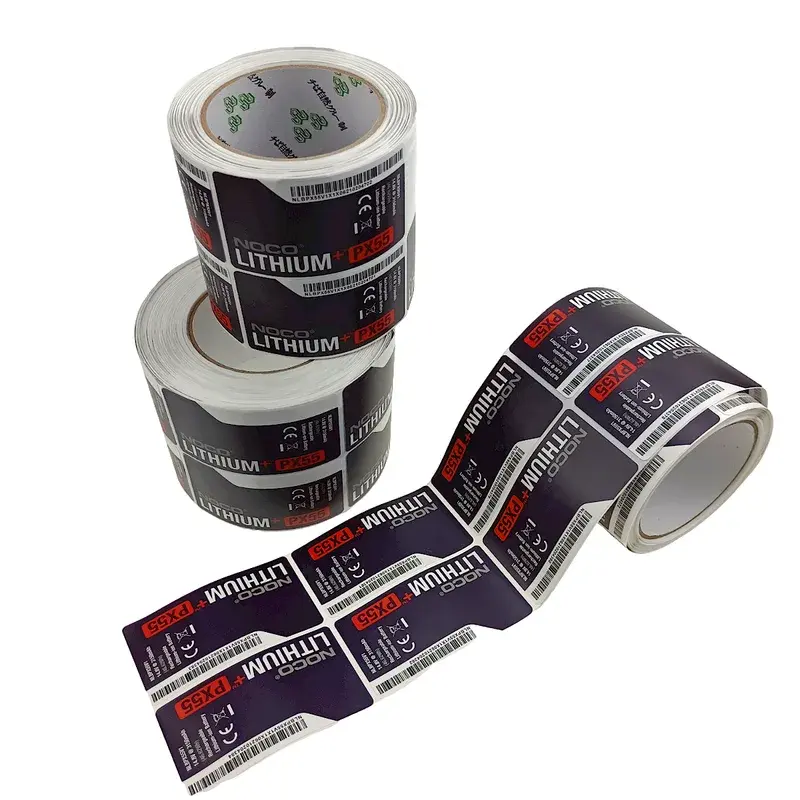
Code data and version list
Supply the actual data, code requirements and version list.
Placement and readable space
Review placement and readable space within the packaging design.
Printed check and content approval
Check the printed sample and data version before production; the customer supplies and approves the encoded content.
Project details to send
Identify the actual product, intended use and any existing pack or specification.
List quantities by version and the delivery destination. Record which choices still need a recommendation.
Standard MOQ: 500 pieces per style, size and artwork design. Special specifications and combined orders are assessed individually. Material and performance requirements are confirmed for the specific application.
Related customization services
Artwork & Dieline Support
Bring artwork, structural outlines and production versions into one approval process.
Packaging Printing
Plan artwork and printing around the selected packaging material and construction.
Approved reference and design changes
Identify the product, material and file version. Record the chosen option, compatibility limits and the proof or sample needed; an example on another pack does not establish suitability.
Keep the approved reference with the order. Changes to design, dimensions, material or effect may require revised files, samples or pricing. Compare sample types.
Scope, fees and scheduling
The number of records, version control, layout, print method and verification requirements affect preparation.
Give quantities by product and artwork version, plus any deadline. The quotation confirms fees, tooling, samples, revisions and timing; free services and rush delivery are not standard commitments. Prepare the project details.
Separate artwork from the controlled data list
Identify code type, data source, variable fields, print size and application surface. Provide approved content and version mapping instead of embedding an unverified spreadsheet into artwork.
Approval record: Printed check and content approval
Check printed codes in their final position and use the required verification approach. Ordinary scanning and formal barcode verification answer different questions.
| Reference | Record for barcodes & variable data |
|---|---|
| Input | The material, component and current file or product version. |
| Sample | Which effect or function the sample demonstrates. |
| Decision | The approved result, any limitations and changes still to resolve. |
Further reference
GS1: barcode verification guidance. Use the source to understand the topic; it does not certify an ElevaPack product or replace an agreed project specification.
Review your barcodes & variable data requirements
Email your barcodes & variable data requirements with the packaging type, material and current artwork or sample. State which result needs review before approval.
Barcodes & Variable Data FAQ
Supply the actual data, code requirements and version list.
Review placement and readable space within the packaging design.
Check the printed sample and data version before production; the customer supplies and approves the encoded content.